Reset system
The GECKO5Modular provides a user reset. This user reset can be used to only reset your system that is mapped in your FPGA.
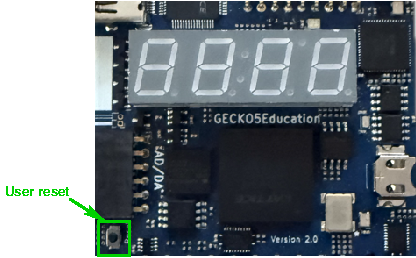
Using the user reset
The user reset is a button that has a pull-up and is connected to a clock input of the FPGA. It can of course also be used for another function as reset.
Note
The user reset is active-low. Meaning that activating it will deliver a logic 0. Otherwise it will produce a logic 1.
In this section you find a VHDL and Verilog top-level and the corresponding lpf-file that you can use to use the above described user reset button.
Important
Although VHDL is case-insensitive, the lpf-file is not. Meaning that the port-names in the top-level entity need to be copied exactly in the lpf-file.
An example for a VHDL top-level entity is shown below:
library ieee;
use ieee.std_logic_1164.all;

entity toplevel is
  port ( nReset  : in  std_logic;
         ...);
end toplevel;
An example for a Verilog top-level is shown below:
module toplevel (
  input wire nReset,
             ...);
  ...
endmodule
To connect nReset to the correct location, following lines must be added to the lpf-file:
LOCATE COMP "nReset" SITE "G1";
IOBUF  PORT "nReset" PULLMODE=NONE IO_TYPE=LVCMOS33;
Important
Note the case-sensitivity of the lpf-file.
The tools require exactly one lpf-file, hence all assignments you use need to be in a single lpf-file.
Summary
Below a table with all required information for the user reset button:
Name : |
FPGA pin: |
Activity: |
IO_TYPE: |
Pull-up/down: |
|---|---|---|---|---|
User Reset |
G1 |
Active-low |
LVCMOS33 |
NONE |